
 David A. Fields Consulting Group
 A simple step will generate enormous, lasting impact for your consulting firm.
It’s easy. In fact, you’ve probably implemented the idea to some degree already.
Now it’s time to shift the practice into high gear.
Of all the odd things to like about a house, the one feature of my house that I think is most fun is the linen closet.
The doors on each section of the closet are mounted to cool, German lifting hinges. But the best part is you just tap on the doors and they spring open.

There are doodads—push-latches—affixed to the cabinet that crack the door panels open, granting clean, seamless access to the fresh towels and sheets inside.
What do push-latches have to do with your consulting firm?
They’re simple mechanisms that make a repetitive task simpler, faster, and more consistent.
There’s a name for that type of mechanism in consulting firms too:
Templates
Starting routine tasks from scratch every time decelerates your pace and, importantly, reduces your consulting firm’s value to clients.
In contrast, standardizing your tasks and springboarding off of templates increases your efficiency and value.
This is particularly true as AI gains a foothold in consulting. AI engines and (well-designed) templates are a match made in heaven.
Good templates encode your consulting firm’s thinking—your frameworks, tone, and logic—so that your AI’s output reflects your unique IP rather than spitting out generic advice.
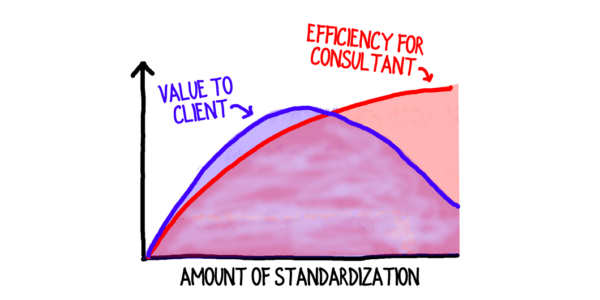
Every template and written process you create for your firm is a push-latch.
Plus, by constantly improving your templates with each newly discovered best practice, you compound their power.
Well-crafted, detailed templates enable AI to work faster and smarter—so your output stays sharp, your team moves quickly, and your firm consistently delivers high-value results.
Of course not every template needs to be fuel for AI. Templates are useful for humans too!
Below are just five of the templates we use at our firm to boost our speed and quality.
Examples of Templates
Context Document Template: We use this template to quickly organize our discovery calls into a summary document to ensure we’re seeing eye-to-eye with prospective clients.
Task Collaboration Template: Anyone on the team who is assigned a task can request a Task Collaboration document—a structured outline of everything they need to succeed with the assignment.
Client Meeting Templates: Most of our meetings with clients follow a familiar pattern. Therefore, we have templates for the most common meetings to keep them on track and enhance the value.
Recap Template: Every consultant and team we work with receives a recap of their commitments and their key learnings. Creating that recap is fast and easy because it’s templated.
Voice of Customer Interview Template: We frequently gather feedback from our clients’ clients. This useful feedback is elevated to invaluable thanks to our templates, which keep the interviews on point and also ensure we’re able to compare client responses to benchmarks.
Your Push-Latch Plan:
Create new templates for your consulting firm, one at a time, over a few months.
- Every other Monday morning, choose one new template you and your team want to create and adopt. Just one. If you have other ideas, put them on a list to draw from at a later date.
- Develop the template over the course of the week. Use AI to help–ask your AI to critique your template and improve it, ideally using an embedded quality rubric.
- File the template in an easy-to-access library.
- Implement the template the following week (or whenever necessary).
- Rinse and repeat.
Over the next six months you’ll implement 13 new templates. Your labor intensity will decline while your quality improves.
What other templates would push your consulting firm into high gear?
Text and images are © 2026 David A. Fields, all rights reserved.

Any process can benefit from templates. In the automotive world, there are PPAP forms for products. In the Six Sigma world, there are hundreds of tools that can be encoded as a template–SIPOC diagrams, fishbones, value stream maps, etc. I had to do it for myself and included them in our QI Macros for Excel software. These templates collapse the time it takes to create an improvement project.
Microsoft Office will let you store templates for future use. Create your own templates and store them someplace everyone can use them–Google drive, Dropbox, Sharefile, etc.. Do once, reuse many times is a recipe for accelerated productivity and profitability.
It takes a little work to get a standardized system in place, but it will pay for itself over and over. It’s one shortcut to getting things done well and consistently.
Those are all terrific examples, Jay. As you noted, it takes a bit of upfront investment to develop the templates, but they pay off in spades down the road.
Love the push-latch metaphor, David. We’ve built plenty of templates for pitch documents, but not enough for client deliverables. Curious (in future articles/conversation) if you have found a way to balance templates with the need to keeping deliverables fresh, so clients feel like they’re getting something unique.
Interesting question, Steven. Generally speaking, I haven’t found that clients particularly value uniqueness in deliverables/outputs. They care about relevance, value, and whether it helps them solve their problem/achieve their aspiration. No one has ever said to me, “That’s a terrific recommendation and it will really move our business forward, but I wish you’d told me something unique and fresh instead.” Of course, if part of the value they’re looking for is uniqueness, then you can build that into your templates too.
Thanks for the thought-providing question, Steven!
A very fair point David and thank you. On reflection, there are only a few examples that come to mind of this as well beyond the deep tailoring to industry/company that most clients expect.